Do Nissan Altimas Lock Automatically When You Leave
Yes, most Nissan Altima models come with an auto lock feature that secures your vehicle when you walk away. This smart security system uses the Nissan Intelligent Key to detect when you have left the vicinity and locks the doors automatically. Understanding how this feature works can help you feel more confident about vehicle safety every time you step out of your car.
Have you ever walked away from your car and wondered, “Did I lock it?” That nagging feeling is something every driver knows too well. The good news is that the Nissan Altima has a solution. The auto lock feature on many Altima models takes away that worry entirely. When you step away from the vehicle, the doors lock themselves. It is one of those small conveniences that makes a big difference in your daily routine.
But here is the thing not every Altima model handles this the same way. The auto lock behavior can vary depending on the model year, trim level, and even the settings you have chosen. Some Altimas lock the moment you walk past the proximity sensor on the door handle. Others need you to press the lock button on the key fob one last time. Understanding how your specific Altima works can save you time and give you peace of mind. In this guide, we break down everything you need to know about the Nissan Altima auto lock system.
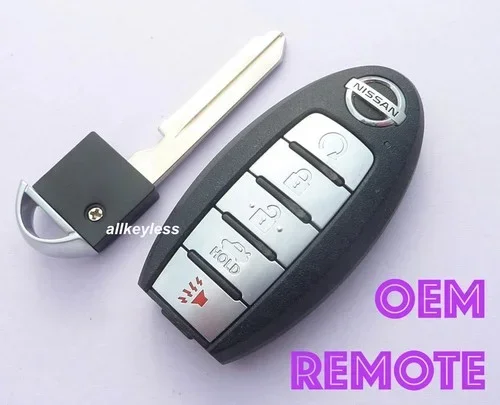
The Nissan Intelligent Key system is at the heart of this feature. It is a smart technology that lets you lock, unlock, and even start your car without taking the key fob out of your pocket. The system uses radio frequency signals to communicate between the fob and the vehicle. When the fob moves beyond a certain range, the car knows you have left. From there, the automatic door locking process kicks in. It is seamless, it is convenient, and it is designed to keep your vehicle secure at all times.
Key Takeaways
- Auto lock is standard on most modern Nissan Altima models and engages when you walk away from the vehicle with the key fob.
- You can customize the lock settings through the vehicle information display to suit your preferences.
- The feature relies on the proximity sensor built into the Nissan Intelligent Key system to detect when you are no longer near the car.
- Common issues include dead key fob batteries and sensor malfunctions, both of which are easy to troubleshoot.
- Older Altima models may not have auto lock as a standard feature, so checking your specific year matters.
- Disabling auto lock is possible through the vehicle settings menu if you prefer manual control.
📑 Table of Contents
How the Auto Lock Feature Works on Nissan Altimas
The auto lock system on the Nissan Altima is built around the keyless entry technology. When you have the Intelligent Key on your person, the car constantly monitors the distance between you and the vehicle. This is done through a low-energy Bluetooth signal and radio frequency communication between the fob and the car’s vehicle security system. Once the fob moves outside the detection range which is typically about 6 to 10 feet the system triggers the power door locks to engage.
Here is how it typically works step by step. You walk away from your Altima with the key fob in your pocket or bag. As you move further away, the proximity sensor on the door handle or inside the cabin detects the increasing distance. Once you are out of range, the car sends a signal to lock all doors. You may hear a chime or see the flash the lights confirm the action. Within seconds, your Altima is fully secured.
The Role of the Proximity Sensor
The proximity sensor is the unsung hero of the auto lock system. It is a small device usually located in the door handle or beneath the side mirror. Its job is to constantly ping the key fob and measure the distance. When the signal weakens past a set threshold, the sensor tells the central locking module to engage. This process happens almost instantly. You do not need to press any buttons or take any extra steps. It is all handled by the car’s computer system behind the scenes.
One thing to keep in mind is that the proximity sensor only works when the ignition is off and you are not inside the vehicle. If you are sitting in the driver seat with the fob nearby, the system will not trigger a lock. This is by design. Nissan engineers built the system this way to prevent accidental lockouts. The last thing anyone wants is to get locked out of their own car while standing right next to it.
What Happens When You Have the Key Fob Inside
Sometimes you might leave the key fob inside the car. Maybe you set your bag down on the passenger seat and walked away. In most cases, the Altima will not lock if the fob is still detected inside the cabin. The vehicle safety system is designed to recognize the presence of the key fob and prevent the doors from locking. This is an important safety feature that prevents people from accidentally locking their keys inside the car.
However, there is a slight exception. Some Altima models with the lockout prevention feature will allow you to lock the doors even with the fob inside, but only if you explicitly press the lock button. The car will not auto lock in this scenario because it senses the fob is still present. This is a smart design choice that balances convenience with security.
Which Nissan Altima Models Have Auto Lock
Not every Nissan Altima comes with the same features. The auto lock function is standard on most recent model years, but older models may not have it. Let us break down what you can expect across different generations of the Altima.
Nissan Altima 2019 and Newer
If you own or are considering a Nissan Altima 2019 or newer model, you almost certainly have the auto lock feature. Starting with the seventh generation Altima, Nissan made the Intelligent Key system standard across all trims. This means the auto lock function came bundled with the keyless entry package. Whether you have the base S trim or the top-tier Platinum, your Altima will lock automatically when you walk away.
The 2019 and newer models also introduced improved smart lock technology that is more reliable than earlier versions. The sensors are more accurate, and the locking response time is faster. Nissan also added a feature where the mirrors fold in automatically when the car locks, giving it a polished look while you are away.
Nissan Altima 2013 to 2018
The mid-generation Altimas from 2013 to 2018 also have the auto lock feature, but it depends on the trim level and optional packages. Higher trims like the SL and SV typically include the Intelligent Key system with auto lock as a standard feature. Base models with the manual key might not have this capability. If your Altima from this era has keyless entry, there is a strong chance it also has automatic locking.
For those models, the auto lock behavior might be slightly different. Some older Altimas require you to turn the ignition off and walk away from the driver door. The car then detects the fob leaving the zone and locks up. It is a slightly slower process compared to the newer models, but it gets the job done.
Nissan Altima 2007 to 2012
The older Altima models from 2007 to 2012 may or may not have auto lock. This era of the Altima offered keyless entry as an option, but automatic door locking was not always included. If your Altima is from this period, check your owner manual or look for the keyless entry buttons on the door handle. If your car has those buttons, it likely supports some form of automatic locking when you press them manually.
For older models without the auto lock feature, you can still add aftermarket solutions. Universal keyless entry systems are available at most auto parts stores. They can be installed relatively easily and give your older Altima the same convenience as a newer model. Just make sure the installation is done properly to avoid any issues with the vehicle electrical system.
How to Enable or Disable Auto Lock on Your Nissan Altima
One of the great things about modern Nissan Altimas is that you can customize the auto lock behavior. Whether you want it on or off, the choice is yours. The process is straightforward and can be done through the vehicle information display screen located on the dashboard.
Turning Auto Lock On
If your Altima came with auto lock disabled from the factory or you accidentally turned it off, here is how to turn it back on. First, start the engine and make sure the car is in park. Then navigate to the vehicle settings menu on the display screen. Look for the “Door Lock” or “Keyless Entry” section. You should see an option for “Auto Lock” or “Lock Doors When Removed.” Select that option and set it to “On.” The car will confirm the change, and from that moment on, your Altima will lock automatically every time you walk away.
Turning Auto Lock Off
Some drivers prefer to lock their doors manually. Maybe you have had issues with the auto lock feature in the past, or perhaps you just like having more control. Whatever the reason, turning auto lock off is just as easy. Go to the same vehicle settings menu mentioned above. Find the auto lock option and toggle it to “Off.” Once disabled, your Altima will only lock when you press the lock button on the key fob or use the manual lock switch inside the car.
Keep in mind that disabling auto lock means you are responsible for manually locking your car every time. This might sound like a hassle, but many drivers actually prefer it. It gives them a sense of control and helps them avoid situations where the car locks unexpectedly. For example, if you are loading groceries into the trunk and step away briefly, an auto lock could trap your keys inside the vehicle.
Adjusting Other Lock Settings
The Nissan Altima also lets you adjust related lock settings. You can choose whether the locks engage when you shift the car into drive. You can set whether the doors unlock automatically when you put the car in park. These settings work together with the auto lock feature to create a customized locking experience. Spend a few minutes exploring the menu to find the combination that works best for your driving habits.
For more information on vehicle settings and diagnostic features, you can check our article on Does AutoZone Do a Full Diagnostic Test to learn how you can verify your car’s electronic systems at your local auto parts store.
Common Issues with Nissan Altima Auto Lock
The auto lock system on the Nissan Altima is generally reliable, but like any electronic feature, it can run into problems from time to time. Knowing what to look for can save you a lot of frustration and help you address issues before they become bigger problems.
Dead Key Fob Battery
The most common reason for auto lock failure is a dead key fob battery. The Intelligent Key fob uses a small coin-cell battery that typically lasts between two and three years. When the battery starts to weaken, the fob may not communicate properly with the car. You might notice that the auto lock feature becomes inconsistent or stops working altogether. Replacing the battery is simple and inexpensive. Most Nissan Altima fobs use a CR2032 battery, which you can pick up at any grocery store or pharmacy.
To replace the battery, use a small flathead screwdriver to pry open the fob casing. Remove the old battery, insert the new one with the positive side facing up, and snap the casing back together. Once the new battery is in place, test the auto lock feature by walking away from the car. If the doors lock as expected, the problem is solved.
Faulty Proximity Sensor
Sometimes the issue is not with the key fob but with the proximity sensor itself. These sensors can malfunction due to moisture damage, physical impact, or simply wear and tear over time. If the sensor cannot detect the key fob properly, it will not trigger the auto lock. You might notice that the car does not lock even when you are well beyond the normal detection range.
If you suspect a faulty sensor, it is worth having a professional diagnose the issue. You can visit your local auto parts store for a diagnostic check. For more on what diagnostic services are available, check out our guide on Do You Have to Calibrate Adaptive Cruise Control, which covers how Nissan’s electronic systems are tested and calibrated.
Software Glitches
Modern cars are essentially computers on wheels, and sometimes they experience software glitches. A glitch in the central locking module can cause the auto lock feature to behave erratically. The doors might lock too early, lock too late, or not lock at all. In most cases, a simple software update from your Nissan dealer can fix the problem. Dealers have the tools to flash the latest software to your car’s computer system, which often resolves these kinds of issues.
Interference from Other Devices
This one is less common but worth mentioning. Electronic devices near the key fob can sometimes interfere with the signal between the fob and the car. If you keep your fob in a bag with a laptop, tablet, or other electronic devices, the interference might prevent the proximity sensor from detecting the fob correctly. Try moving the fob to a different location and see if that resolves the issue.
Tips for Maximizing Your Altima’s Security Features
The auto lock feature is just one part of the Nissan Altima’s broader security system. There are several things you can do to make sure your car stays as safe as possible. Here are some practical tips that every Altima owner should know.
- Keep your key fob away from windows and exterior doors. The signal can sometimes leak out through thin metal or glass, causing the car to lock prematurely or not at all.
- Replace the key fob battery every two years even if it still seems to work. A weak battery can cause intermittent issues with the auto lock feature.
- Use the NissanConnect app if your Altima is equipped with it. The app lets you remotely lock and unlock your car from your smartphone, giving you an extra layer of control.
- Park in well-lit areas whenever possible. The auto lock feature is great, but it works best when combined with good parking habits.
- Enable the security alert feature if your Altima has it. This setting sends a notification to your phone if someone tries to tamper with the vehicle.
- Keep your software up to date. Nissan regularly releases updates that improve the performance of the keyless entry and locking systems.
- Always double-check that your car is locked before walking away. Even with auto lock, it is a good habit to confirm the doors are secure.
Quick Tips for Everyday Use
Here are a few quick tips to make the auto lock feature work even better for you. First, always carry your key fob in the same pocket or compartment. This helps the proximity sensor maintain a consistent connection with the car. Second, if you are carrying heavy bags or groceries, make sure the fob is not buried at the bottom of your bag where the signal might be blocked. Third, if you have passengers who do not have key fobs, make sure they exit the car before you walk away. The auto lock system will not trigger if the fob is still inside the vehicle.
Another helpful tip is to familiarize yourself with the manual lock and unlock controls inside the car. These are usually located on the driver door panel and can be used as a backup if the auto lock system ever fails. Knowing where these controls are and how to use them can save you from getting locked out in an emergency.
Common Mistakes to Avoid
One common mistake is assuming the auto lock feature works the same way on every Nissan model. It does not. The Altima’s system is different from the Nissan Sentra or Nissan Rogue. Another mistake is ignoring warning signs. If your Altima starts locking inconsistently or the fob battery dies frequently, do not ignore it. These are early warning signs of a bigger problem that could affect your vehicle security system. Addressing them early can save you from more serious issues down the road.
Some drivers also make the mistake of modifying their key fob without professional help. Aftermarket fob replacements can sometimes be incompatible with the auto lock system. Always purchase genuine Nissan parts or consult a certified dealer when replacing your key fob. This ensures full compatibility with the Nissan Intelligent Key system and all its features.
Final Thoughts on Nissan Altima Auto Lock
The Nissan Altima is a solid, reliable sedan that comes packed with modern convenience features. The auto lock system is one of the most practical and appreciated features among Altima owners. It adds a layer of security that is both effortless and effective. Whether you are heading to work, running errands, or just stepping out for a quick moment, knowing your car is locking itself behind you brings genuine peace of mind.
Understanding how the system works, knowing how to adjust the settings, and being aware of common issues puts you in control. You will never have to wonder again whether you left your Altima unlocked. The Nissan Altima lock automatically feature handles that for you, every single time, as long as everything is working as it should.
Take a few minutes to explore your Altima’s settings and make sure the auto lock feature is configured the way you want it. It is a small adjustment that pays off big in terms of convenience and security. Your Nissan Altima is designed to protect you and your vehicle. The auto lock feature is just one example of how Nissan engineers have thought ahead to make your driving experience smoother and safer.
For those with hybrid models, if you are curious about how other features work on electrified vehicles, you might find our article on Do Hybrid Cars Need Charging helpful for understanding the broader ecosystem of modern car technology.
Frequently Asked Questions
Do all Nissan Altima models have the auto lock feature?
Most Nissan Altima models from 2013 onward come with the auto lock feature as part of the keyless entry package. However, older models and base trims may not include it. Check your owner manual or consult a Nissan dealer to confirm whether your specific Altima has this feature.
Can I turn off the auto lock feature on my Nissan Altima?
Yes, you can disable the auto lock feature through the vehicle settings menu on the dashboard display. Navigate to the Door Lock or Keyless Entry settings and toggle the auto lock option to off. Keep in mind that you will then need to manually lock your car each time.
Why does my Nissan Altima not lock automatically when I walk away?
The most common reason is a weak key fob battery. Other possible causes include a faulty proximity sensor, software glitches, or electronic interference from nearby devices. Replacing the fob battery is the first step in troubleshooting the issue.
How far do I need to walk away for the Altima to auto lock?
The auto lock feature typically triggers when the key fob is about 6 to 10 feet away from the vehicle. The exact distance depends on the model year and the strength of the fob signal. Once the fob moves out of the detection range, the doors lock automatically.
Is the Nissan Altima auto lock feature safe and secure?
Yes, the auto lock feature is designed with security in mind. It uses encrypted signals between the key fob and the vehicle to prevent unauthorized access. The system only locks when it confirms the fob is no longer near the car, which helps prevent accidental lockouts and unauthorized entry.
Can I add auto lock to an older Nissan Altima that does not have it?
Yes, aftermarket keyless entry systems can be installed on older Altima models to add auto lock functionality. These systems are widely available and can be installed by a professional installer or a knowledgeable DIY enthusiast. Make sure to choose a system that is compatible with your Altima’s electrical setup.
=== CONCLUSION ===
The Nissan Altima lock automatically feature is one of those everyday conveniences that you quickly come to rely on. It keeps your vehicle secure without requiring any extra effort from you. From the proximity sensor technology to the smart key fob communication, every part of the system is designed to work seamlessly in the background. Understanding how it works, knowing how to adjust the settings, and being aware of common issues ensures you get the most out of this feature. Whether you drive a Nissan Altima 2024 or an older model, the auto lock system adds a valuable layer of protection and convenience to your daily driving experience. Take the time to explore your settings, keep your fob battery fresh, and enjoy the peace of mind that comes with knowing your Altima locks itself every time you walk away.