Can Navigation Be Added to a Toyota Pickup Truck Now
Yes, you can add navigation to a Toyota pickup truck, whether through a factory upgrade or an aftermarket system. Adding GPS navigation to your Toyota improves driving convenience, especially on long trips or in unfamiliar areas. This guide covers every option available, from dealer-installed systems to plug-and-play devices, so you can choose the best fit for your truck and budget.
Owning a Toyota pickup truck is a great experience. These trucks are tough, reliable, and built to last. But one thing that can frustrate a lot of owners is the lack of built-in navigation. If you have ever gotten lost on a road trip or struggled to find a new address, you know how annoying that can be.
The good news is that navigation can absolutely be added to a Toyota pickup truck. Whether you drive a Tacoma or a Tundra, there are several ways to get GPS guidance working in your vehicle. You do not need to buy a whole new truck to get this feature. In this article, we will walk through every option available to you right now.
Adding navigation to a Toyota pickup is not just about finding directions. It also improves safety, saves time, and makes long drives much more enjoyable. Let us dive into the details and help you figure out the best path forward for your truck.
Key Takeaways
- Factory Navigation Option: Toyota offers built-in navigation systems on many newer pickup models, and older trucks can sometimes be upgraded through a dealer.
- Aftermarket Systems Are Affordable: You can install an aftermarket GPS unit or a smartphone-based navigation app for a fraction of the cost.
- Compatibility Matters: Not every Toyota pickup year and trim supports the same navigation upgrades, so check your model first.
- Smartphone Apps Work Great: Apps like Google Maps and Waze offer free turn-by-turn navigation that pairs with your truck’s audio system.
- Installation Options Vary: You can DIY a simple setup or pay for professional installation depending on the system you choose.
📑 Table of Contents
- Why Navigation Matters in a Toyota Pickup Truck
- Factory Navigation Options for Toyota Pickups
- Aftermarket Navigation Systems for Toyota Pickups
- How Much Does It Cost to Add Navigation to a Toyota Pickup?
- Can You Negotiate the Cost of Adding Navigation?
- Tips for Choosing the Right Navigation System
- Common Mistakes to Avoid When Adding Navigation
- Final Thoughts
Why Navigation Matters in a Toyota Pickup Truck
Some people think navigation is a luxury. They believe they can just use paper maps or ask for directions. But the truth is, GPS navigation has become a basic need for many drivers. Here is why it matters so much for Toyota pickup owners.
Better Route Planning
A navigation system helps you plan the best route before you even leave your driveway. It considers traffic, road closures, and construction zones. This means fewer surprises and less wasted time on the road.
Improved Safety
When you do not have to fumble with your phone while driving, you stay safer. A Toyota navigation system gives you clear voice directions so your eyes stay on the road and your hands stay on the wheel.
Better for Work and Hauling
Pickup truck owners often drive to job sites or delivery locations they have never been to before. GPS navigation helps you find these places quickly without asking around or guessing. This is especially true for contractors and delivery drivers who rely on their trucks every day.
Factory Navigation Options for Toyota Pickups
If you want the most seamless experience, factory-installed navigation is the way to go. Toyota has offered built-in GPS systems in many of its pickup models over the years. Let us look at what is available.
Toyota Tacoma Navigation Options
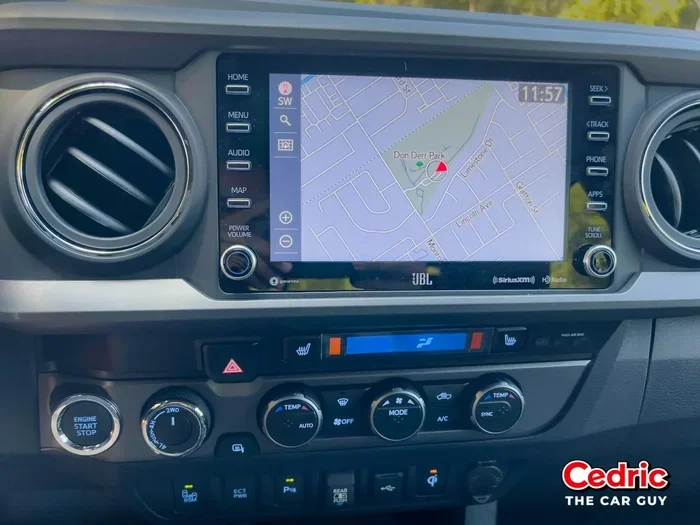
The Tacoma is one of the most popular pickup trucks on the road. Toyota has included navigation in several Tacoma trims over the years. Newer model years, especially those from 2018 onward, often come with a Toyota infotainment system that includes GPS navigation as part of the package.
If your Tacoma does not have navigation from the factory, you still have options. A dealer can sometimes install an upgraded head unit that adds Toyota navigation capability. This is called a factory-compatible upgrade, and it keeps everything looking and working like it came from the manufacturer.
Toyota Tundra Navigation Options
The Tundra is Toyota’s full-size pickup, and it has a larger dashboard space that makes navigation systems easier to integrate. Newer Tundra models come with a Toyota multimedia display that includes built-in GPS. If you own an older Tundra, a dealer or specialty shop can retrofit a navigation-compatible head unit into the existing dashboard.
How to Check If Your Toyota Already Has Navigation
Before you spend any money, check whether your truck already has navigation capability. Here are a few quick ways to find out:
- Look for a “Nav” button on your infotainment screen or dashboard.
- Check your owner’s manual for the technology package details.
- Look at your trim level. Higher trims like the Tacoma TRD Pro or Tundra Platinum often include navigation.
- Check the screen size. Trucks with navigation usually have a larger touchscreen display.
Aftermarket Navigation Systems for Toyota Pickups
If factory navigation is not available or too expensive, aftermarket systems are a fantastic alternative. These are GPS units and infotainment upgrades made by companies other than Toyota. They work with almost any pickup truck, regardless of the year or model.
Portable GPS Units
Portable GPS devices are one of the simplest ways to add navigation to a Toyota pickup. Brands like Garmin and TomTom make units that mount on your dashboard or windshield. They plug into a power outlet and start working right away. These units are affordable, usually ranging from $100 to $300, and they do not require any permanent installation.
The downside is that a portable unit is not integrated into your truck’s system. It sits on your dash or windshield, and it does not control your audio or display. But for basic turn-by-turn directions, they work great.
Aftermarket Head Units
An aftermarket head unit replaces your current radio and infotainment screen with a new one that includes built-in GPS navigation. Brands like Pioneer, Kenwood, and Sony make head units designed to fit Toyota dashboards. These units often include Bluetooth, Apple CarPlay, Android Auto, and of course, GPS navigation.
Installation costs for an aftermarket head unit typically range from $200 to $800, depending on the brand and features. Some people choose to install these themselves, while others prefer professional installation. Either way, the result is a fully integrated navigation experience that looks factory-installed.
Smartphone-Based Navigation
Do not overlook the power of your smartphone. Apps like Google Maps, Waze, and Apple Maps offer free turn-by-turn navigation that works just as well as any built-in system. You can mount your phone on your dashboard or windshield and use it just like a dedicated GPS unit.
For a more seamless experience, consider getting a Bluetooth car kit or a wireless charging mount. This lets you use your phone’s navigation while keeping it charged and connected to your truck’s audio system for directions through your speakers.
How Much Does It Cost to Add Navigation to a Toyota Pickup?
Cost is a big factor when deciding how to add navigation to a Toyota pickup truck. The price varies widely depending on the method you choose. Here is a breakdown of what you can expect.
| Option | Cost Range | Installation | Integration Level |
|---|---|---|---|
| Factory Dealer Upgrade | $500 – $2,000 | Dealer Installed | Seamless, OEM Look |
| Aftermarket Head Unit | $200 – $800 | DIY or Professional | High, Custom Fit |
| Portable GPS Unit | $100 – $300 | None Needed | Standalone |
| Smartphone App | Free | None Needed | Basic, Phone-Dependent |
| Complete Infotainment System | $1,000 – $3,000 | Professional | Very High |
As you can see, there is an option for every budget. If you want the best experience and have the money, a factory dealer upgrade is the top choice. If you are on a tighter budget, a smartphone app or portable GPS unit works surprisingly well.
Can You Negotiate the Cost of Adding Navigation?
If you are buying a new or used Toyota pickup, you might be able to negotiate the cost of adding navigation. When you purchase a truck from a dealer, you have leverage to ask for extras at a reduced price. This is especially true if the truck has been sitting on the lot for a while or if you are buying during a slow sales period.
Some buyers have had success asking the dealer to include a navigation upgrade at cost or to throw it in as part of a package deal. It never hurts to ask, and the worst they can say is no. If you are interested in learning more about negotiating with dealers, check out our guide on whether you can negotiate on a factory order car for helpful tips.
Tips for Choosing the Right Navigation System
With so many options available, choosing the right navigation system for your Toyota pickup can feel overwhelming. Here are some tips to help you make the best decision.
- Consider Your Budget First: Decide how much you are willing to spend before you start shopping. This narrows down your options quickly.
- Think About Your Driving Habits: If you drive long distances often, a built-in system with lifetime map updates is worth the investment. If you only need directions occasionally, a free app will do the job.
- Check Compatibility: Make sure the system you choose is compatible with your Toyota model and year. Some head units are designed specifically for certain Toyota models.
- Look for Map Updates: A good navigation system should offer regular map updates. Outdated maps can lead you to wrong turns and dead ends.
- Read Reviews: Before buying any system, read reviews from other Toyota owners. Their real-world experience can save you from making a costly mistake.
Common Mistakes to Avoid When Adding Navigation
Adding navigation to your Toyota pickup is straightforward, but there are a few common mistakes that can cause problems. Here is what to watch out for.
- Buying the Wrong Head Unit: Not every head unit fits every Toyota model. Measure your dashboard opening and check compatibility before purchasing.
- Skipping Professional Installation: While DIY installation saves money, it can also lead to wiring issues if you are not careful. If you are not confident, pay for professional installation.
- Forgetting About Warranty: Adding an aftermarket system can sometimes void parts of your truck’s warranty. Check with your dealer before making any changes.
- Ignoring Software Updates: A navigation system is only as good as its maps. Forgetting to update your maps means you could miss new roads or closures.
Final Thoughts
The short answer to whether navigation can be added to a Toyota pickup truck is a clear yes. You have more options today than ever before. From factory upgrades to smartphone apps, there is a solution for every budget and every truck model.
Adding GPS navigation to your Toyota pickup makes every drive better. You spend less time getting lost and more time enjoying the road. Whether you choose a dealer-installed system, an aftermarket head unit, or a simple phone app, the key is to pick the option that fits your needs and budget.
Take some time to explore your options, and do not be afraid to ask questions at your local Toyota dealer. The right navigation system will make your pickup truck feel even more capable and convenient. Happy driving!
Frequently Asked Questions
Can I add navigation to an older Toyota pickup truck?
Yes, you can add navigation to older Toyota pickups using aftermarket head units or portable GPS devices. Even trucks from the early 2000s can benefit from these upgrades. The installation process is straightforward, and the cost is usually quite affordable.
Is it better to use a smartphone app or a built-in navigation system?
Both have their advantages. Smartphone apps like Google Maps and Waze are free and always up to date. Built-in systems offer a more seamless experience and better integration with your truck’s audio and display. Choose based on your budget and how often you use navigation.
How long does it take to install a navigation system in a Toyota pickup?
A portable GPS unit takes just minutes to set up. An aftermarket head unit installation usually takes one to three hours at a shop. A factory dealer upgrade may take a few days depending on parts availability and scheduling.
Will adding navigation void my Toyota warranty?
It depends on how the system is installed. Factory-approved upgrades through a Toyota dealer will not void your warranty. Aftermarket installations done improperly could potentially cause issues, so always consult your dealer before making changes.
Do I need an internet connection for Toyota navigation to work?
Built-in Toyota navigation systems use preloaded maps and do not always need internet. However, some features like live traffic updates do require a data connection. Aftermarket systems and smartphone apps typically need internet for the best experience.
Can I use my Toyota’s existing audio system with a new navigation setup?
Yes, most aftermarket head units are designed to integrate with your existing Toyota audio system. They can control your speakers, subwoofers, and amplifiers just like the original system. Make sure to choose a unit that matches your truck’s wiring harness for the easiest setup.