Start Your Car With App Instead of a Traditional Key
Starting your car with an app instead of a key is a game-changer for modern drivers. This guide covers everything you need to know about keyless ignition, smartphone-based vehicle access, and how connected car technology is transforming the way we drive. You will learn which cars support it, how to set it up, and whether it is safe and secure.
There was a time when you needed a physical key to start your car. You fumbled through your pockets, worried about losing it, or dealt with a dead battery in the remote. Those days are fading fast. Today, you can start your car with app instead of a key. It sounds like something from a sci-fi movie, but it is real, it is available now, and it is changing how we think about driving.
The idea of app-based car ignition is simple. You use your smartphone as a digital key. You tap a button, and your engine starts. No physical key is needed. This technology is part of a bigger shift called the connected car revolution. Cars are becoming smarter, more intuitive, and more connected to our daily lives than ever before.
In this article, we will walk you through everything you need to know. We will cover how the technology works, which vehicles support it, how to set it up, and whether it is safe. By the end, you will understand why millions of drivers are making the switch to digital key systems. Let us dive in.
Key Takeaways
- App-based car starting lets you ignite your engine remotely using your smartphone.
- Many new vehicles from brands like Tesla, BMW, and Ford already support digital key technology.
- Keyless entry and push button start systems make traditional keys almost obsolete.
- Security features like encryption and authentication protect your vehicle from unauthorized access.
- Setting up app-based ignition is simple and usually takes just a few minutes.
- Remote engine start helps you warm up or cool down your car before you get in.
- Future trends point toward fully autonomous and AI-driven vehicle access systems.
📑 Table of Contents
- What Does It Mean to Start Your Car With an App?
- Which Cars Support Starting With an App?
- How to Set Up App-Based Car Starting
- Benefits of Starting Your Car With an App
- Is It Safe? Understanding Car Security With App-Based Systems
- Common Mistakes People Make With App-Based Car Starting
- The Future of Car Ignition: What Comes Next?
- Final Thoughts
What Does It Mean to Start Your Car With an App?
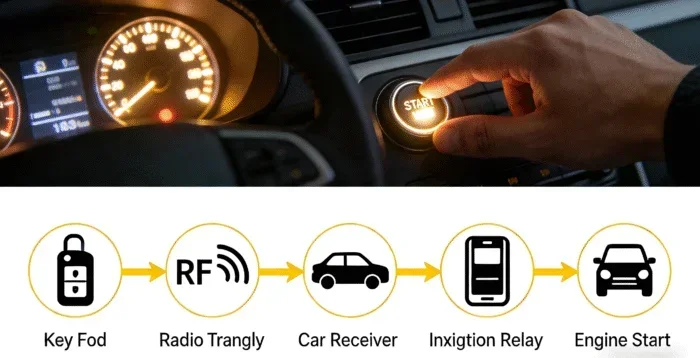
Starting your car with an app means using a smartphone application to control your vehicle’s ignition. Instead of inserting a physical key or pressing a key fob button, you open an app on your phone. The app communicates with your car wirelessly. It sends a signal that unlocks the doors and starts the engine.
This is also known as keyless ignition or digital key technology. Many people confuse it with remote start, which is a related but different feature. Remote start lets you turn on the engine from a distance, usually through a key fob. App-based ignition goes further. It replaces the key entirely.
How Does App-Based Car Ignition Work?
The technology behind app-based ignition relies on wireless communication. Here is a simple breakdown of how it works.
- Bluetooth connectivity: Your phone connects to your car using Bluetooth. This creates a secure, short-range link between the two devices.
- Ultra-wideband (UWB) technology: Some newer systems use UWB for precise location tracking. This ensures your phone is actually near the car before it unlocks.
- Cloud-based authentication: The app verifies your identity through encrypted servers. This adds an extra layer of car security.
- Vehicle computer integration: Once authenticated, the car’s onboard computer receives the signal and allows ignition.
Think of it like this. Your phone becomes a virtual key. It carries the same information a traditional key would, but it does so digitally. The process is fast, seamless, and increasingly secure.
Which Cars Support Starting With an App?
Not every car can start with an app. But the list of compatible vehicles is growing every year. Many car manufacturers now offer app-based ignition as a standard or optional feature. Here are some of the leading brands and models.
Tesla
Tesla was one of the first automakers to go fully digital. Tesla vehicles use a smartphone app as the primary way to access and start the car. You can even share digital keys with family members. There is no physical key card required for daily use, though Tesla does include one as a backup.
BMW
BMW offers a digital key feature through its ConnectedDrive system. You can store your car key in the Apple Wallet or Google Wallet. Then you simply hold your phone near the door handle to unlock and start the engine. It works with several BMW models, including the 3 Series, 5 Series, and X5.
Ford
Ford’s FordPass app allows owners to lock, unlock, and start their vehicles remotely. The system uses Bluetooth connectivity to communicate with the car. Ford has integrated this feature into models like the F-150, Mustang, and Escape.
Other Brands
Many other brands are jumping on board. Here is a quick list of manufacturers offering app-based vehicle access and ignition:
- Chevrolet – MyLink and Chevy App systems
- Hyundai – Bluelink connected services
- Kia – UVO connect app
- Toyota – Toyota App with remote start features
- Lincoln – Lincoln Way app
- Rivian – Rivian app for full digital key control
Before buying a car, always check whether it supports smartphone-based ignition. The feature is becoming a selling point for many brands.
How to Set Up App-Based Car Starting
Setting up app-based car ignition is easier than most people think. The exact steps vary by brand, but the general process is similar across vehicles. Here is a typical setup walkthrough.
- Download the manufacturer’s app. Go to the App Store or Google Play Store. Search for your car brand’s official app. Download and install it.
- Create an account. Open the app and sign up. You will need your vehicle identification number (VIN) and some personal details.
- Pair your phone. Follow the in-app instructions to connect your phone to the car. This usually involves Bluetooth pairing and granting location permissions.
- Test the system. Walk up to your car with your phone. The doors should unlock automatically. Get in and press the start button on the app. The engine should turn over.
- Set up additional security. Enable features like PIN protection or biometric login (fingerprint or face recognition) for extra safety.
The whole process usually takes less than 15 minutes. Once it is set up, you will wonder how you ever drove without it.
Quick Tips for a Smooth Setup
- Keep your phone charged. A dead phone means no digital key.
- Always carry a backup physical key or key card, just in case.
- Update the app regularly to get the latest security patches.
- Make sure your phone’s operating system is compatible with the car’s system.
- Test the system in a safe, familiar location before relying on it fully.
Benefits of Starting Your Car With an App
Why are so many drivers switching to app-based vehicle access? There are several compelling reasons. Let us look at the biggest benefits.
Convenience and Ease of Use
The most obvious benefit is convenience. You never have to dig through your bag for a key. Your phone is always with you. You can start your car from inside your house, warming it up on a cold morning before you even walk outside. This is especially helpful in harsh weather.
Enhanced Security
Modern digital key systems use advanced encryption. They are harder to hack than traditional key fobs. Many systems also include multi-factor authentication. This means someone would need your phone and your passcode or biometric data to start your car. That is a big upgrade over a simple key fob signal.
Remote Control Features
App-based systems do more than just start the engine. You can also:
- Lock and unlock your doors from anywhere
- Check your fuel level and battery status
- Locate your car in a crowded parking lot
- Pre-condition the interior temperature
- Share temporary access with friends or family
Future-Proofing Your Vehicle
Car technology is evolving rapidly. Choosing a vehicle with smartphone-based ignition means your car stays relevant longer. You get software updates over the air. New features get added without visiting a dealership. It is a smart investment for the long haul.
Is It Safe? Understanding Car Security With App-Based Systems
Security is the number one concern for most drivers. After all, you are trusting your car to a piece of technology. Let us address the safety question head-on.
How Do Digital Keys Protect Your Vehicle?
App-based car security relies on several layers of protection:
- Encryption: The signal between your phone and car is encrypted. It is extremely difficult to intercept or clone.
- Proximity detection: The car only responds when your phone is nearby. This prevents relay attacks where thieves amplify a key fob signal from far away.
- Dynamic authentication: The system constantly verifies your identity. It does not just check once and forget it.
- Remote disable: If your phone is stolen, you can remotely disable the digital key through the app or cloud system.
Compared to traditional keys and basic key fobs, app-based ignition is significantly more secure. However, no system is 100% foolproof. That is why following best practices matters.
Best Practices for Keeping Your Car Safe
- Never share your app login credentials with strangers.
- Use strong, unique passwords for your car app account.
- Enable two-factor authentication if the system supports it.
- Keep your phone’s operating system and the car app updated.
- Store a backup physical key in a safe place at home.
- Turn off Bluetooth when you are not using it for extended periods.
- Review app permissions regularly and revoke access for unused devices.
Following these steps gives you strong protection. You get the convenience of keyless entry without compromising your car security.
Common Mistakes People Make With App-Based Car Starting
Even though the technology is straightforward, people still make avoidable mistakes. Here are the most common ones and how to prevent them.
Forgetting to Charge Your Phone
This is the big one. If your phone battery dies, you cannot start your car using the app. Always keep your phone charged, especially before long trips. Carry a portable charger if needed.
Not Having a Backup Plan
Technology can fail. Apps crash. Bluetooth disconnects. Always keep a backup physical key or key card in your glove box. You will be glad you did if something goes wrong.
Ignoring Software Updates
Car manufacturers release updates that fix bugs and patch security holes. Ignoring these updates leaves your vehicle vulnerable. Turn on automatic updates for both your phone and your car app.
Sharing Access Too Freely
It is tempting to share your digital key with everyone. But every time you grant access, you create a potential security risk. Only share with people you trust completely. Use temporary access links when possible, and set expiration dates.
Assuming All Apps Are the Same
Not all car ignition apps are created equal. Some are more reliable than others. Some have better user interfaces. Some work faster. Read reviews, check ratings, and stick with the official app from your car manufacturer whenever possible.
The Future of Car Ignition: What Comes Next?
The connected car industry is moving fast. What we have today is just the beginning. Here are some exciting trends shaping the future of vehicle access and ignition.
Artificial Intelligence and Smart Access
Future systems may use AI to recognize your driving habits and preferences. The car could automatically adjust settings based on who is holding the phone. It might even detect your stress level and adjust the interior environment to help you relax.
Integration With Smart Homes
Imagine pulling into your driveway and your car communicates with your smart home. The garage opens automatically. The lights turn on. The thermostat adjusts. App-based ignition is the gateway to this kind of seamless living.
Biometric Vehicle Access
Some automakers are experimenting with biometric ignition. This means using your fingerprint, face scan, or even heartbeat pattern to start the car. Combined with your phone, this creates a multi-layered security system that is nearly impossible to breach.
Autonomous Vehicle Integration
As autonomous driving technology advances, digital key systems will play a crucial role. You might summon your car to your front door using the app. It starts itself, drives to you, and stops when you arrive. The smartphone as a key concept is central to this vision.
Final Thoughts
Starting your car with an app instead of a key is more than a cool tech feature. It is a practical upgrade that saves time, improves security, and adds real value to your daily driving experience. The technology is mature, the compatible vehicles are plentiful, and the setup is straightforward.
If you are in the market for a new car, look for models that support digital key technology. If you already own a compatible vehicle, take a few minutes to set up the app. You will not regret it. The future of car ignition is here, and it fits right in your pocket.
Embrace the change. Ditch the traditional key. Enjoy the freedom and convenience of keyless vehicle access. Your car, your phone, your way.
Frequently Asked Questions
Can I start any car with an app?
No, not every car supports app-based ignition. You need a vehicle that is equipped with connected car technology and a compatible digital key system. Check with your car manufacturer to see if your model supports this feature.
Is it safe to start my car using a smartphone app?
Yes, it is generally very safe. Modern digital key systems use advanced encryption and multi-factor authentication. They are designed to be more secure than traditional key fobs. However, you should always follow best practices like using strong passwords and keeping your software updated.
What happens if my phone battery dies?
Most systems have a backup plan. You can usually still start your car using a physical key or a backup key card. Always keep a backup option available, and consider carrying a portable phone charger for emergencies.
Can I share my digital car key with someone else?
Yes, most app-based ignition systems allow you to share digital keys. You can grant temporary or permanent access to family members or friends through the app. You can also set permissions, like limiting access to certain hours or features.
Does starting my car with an app drain my phone battery?
Not significantly. The app uses Bluetooth connectivity and occasional cloud communication, which uses very little power. The app itself is lightweight and should not noticeably affect your battery life during normal use.
What car brands offer app-based ignition?
Many brands now offer this feature. Tesla, BMW, Ford, Hyundai, Kia, Toyota, Lincoln, and Rivian are among the leaders. The list continues to grow as more manufacturers adopt smartphone-based vehicle access technology.