Can You Turn Off Traction Control on a RAV4 for Sure
Yes, you can turn off traction control on a RAV4 using the TRAC button located on the dashboard or steering wheel. This feature lets you disable the system for off-road driving, stuck situations, or snowy conditions. Knowing when and how to turn off traction control can improve your driving experience and keep you safe.
Have you ever been stuck in snow or mud and wished you could just turn off traction control on a RAV4? Maybe you are heading out on a dirt trail and want more wheel spin. Or perhaps you are just curious about what that TRAC button does. Either way, you are in the right place.
Traction control is a safety feature designed to keep your car stable. It prevents wheel slippage when the road surface is slippery. But there are times when you actually want your wheels to spin freely. That is where turning off the system comes in handy.
In this guide, we will walk you through everything you need to know. We will cover how to find the button, when it makes sense to disable the system, and what happens when you do. Whether you drive a RAV4 Hybrid or a standard RAV4, this article has you covered.
Key Takeaways
- Easy to Access: The TRAC button is simple to find and press on most RAV4 models.
- Useful for Off-Road: Turning off traction control helps when your wheels get stuck in mud, sand, or snow.
- Safety First: Always turn it back on for normal driving to maintain stability.
- Dashboard Indicator: A warning light tells you when traction control is off.
- Model Differences: The process may vary slightly between RAV4 generations and trims.
- Hybrid Models: RAV4 Hybrid also has the TRAC off feature with the same basic steps.
📑 Table of Contents
- What Is Traction Control on the RAV4?
- How to Turn Off Traction Control on a RAV4
- When Should You Turn Off Traction Control?
- What Happens When You Turn Off Traction Control?
- RAV4 TRAC Button and System Explained
- Common Mistakes When Turning Off Traction Control
- Expert Tips for Using Traction Control on Your RAV4
- Traction Control vs. Other RAV4 Safety Features
- Final Thoughts on Turning Off Traction Control
What Is Traction Control on the RAV4?
Traction control is a computer-based system. It monitors the speed of each wheel on your Toyota RAV4. When it detects that one wheel is spinning faster than the others, it steps in. It reduces engine power or applies the brakes to that wheel. This helps you maintain grip on slippery surfaces.
The system is part of the broader vehicle stability control framework in Toyota vehicles. It works alongside electronic brake force distribution and other safety features. Most RAV4 models come with this system standard. It is designed to keep you safe in rain, snow, and ice.
How Does It Work?
Here is a simple breakdown of how the traction control system works on your RAV4:
- Sensors monitor wheel speed in real time.
- The system detects when a wheel loses grip.
- It reduces throttle input to that wheel.
- It may apply light braking to slow the spinning wheel.
- Power is redirected to wheels with better traction.
This all happens in a fraction of a second. You barely notice it working most of the time. But when you are on a slippery road, it can make a big difference.
How to Turn Off Traction Control on a RAV4
Turning off traction control on a RAV4 is straightforward. The process is similar across most model years. However, there are slight differences between generations. Let us walk you through it step by step.
Locate the TRAC Button
On most RAV4 models, the TRAC OFF button is on the left side of the steering wheel or on the dashboard. Look for a button labeled “TRAC” or “TRAC OFF.” In some older models, you may find it near the gear shifter or on the center console.
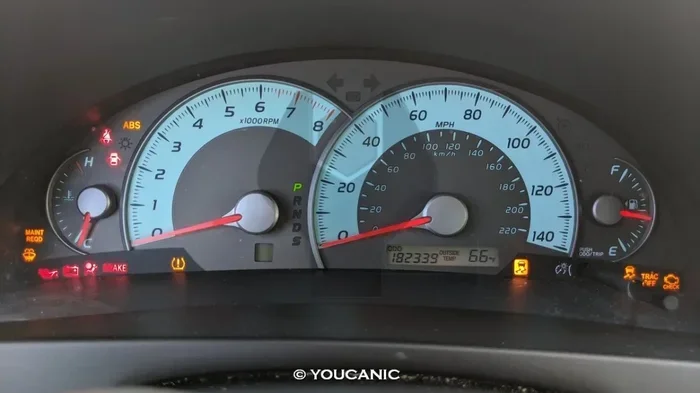
Press and hold the button for about one to two seconds. You will see a warning light appear on the dashboard. This confirms that traction control has been disabled. The light usually looks like a car with squiggly lines beneath it.
Steps by Model Year
The process is very similar across RAV4 generations. Here is a quick look at how it works for different years:
- 2019 and Newer: Press the TRAC button near the steering wheel. The indicator light turns on.
- 2013 to 2018: Look for the TRAC OFF button on the left side of the dash or steering column area.
- 2006 to 2012: The button is typically found on the center console or left dash panel.
- RAV4 Hybrid Models: Same process. The TRAC button is accessible from the steering wheel area.
Once you press the button, the system is off. To turn it back on, simply press the same button again. The indicator light will go off, and traction control will resume.
What If the Button Does Not Work?
Sometimes the TRAC button may not respond. This can happen for a few reasons. First, check if the vehicle is completely stopped. Some systems only allow you to toggle the feature when the car is at a full stop. Second, make sure you are holding the button long enough. A quick tap may not register.
If the button still does not work, there may be a system issue. Check for any warning lights on the dashboard. A check charging system warning or other alert could indicate an electrical problem. In that case, it is best to visit a Toyota service center for a diagnostic check.
When Should You Turn Off Traction Control?
Traction control is great for everyday driving. But there are specific situations where turning it off makes sense. Let us look at the most common scenarios.
Off-Road Driving
If you are taking your RAV4 off the beaten path, you may want to turn off traction control. When driving on dirt, gravel, or rocky terrain, wheel spin is normal. The traction control system may interfere by cutting power too early. This can actually slow you down when you need momentum to climb a hill or cross a rocky section.
For mild off-roading, disabling the system gives you more control. You can let the wheels spin slightly to find grip. Just remember to turn it back on when you return to paved roads.
Getting Stuck in Snow or Mud
One of the most common reasons to disable traction control is when your RAV4 gets stuck. In deep snow or thick mud, the system may keep cutting engine power. It thinks the wheels are spinning too fast. But in these situations, you actually need that spin to dig out and move forward.
Turning off the system allows the wheels to spin freely. This can help you rock the vehicle back and forth to gain momentum. It is a simple trick that many RAV4 owners swear by during winter storms.
Driving on Sand
Sand is another surface where traction control can work against you. The system may brake the wheels every time they start to spin. On loose sand, this can cause you to sink deeper. With traction control off, you can maintain a steady speed and glide over the sand more easily.
Performance Driving
Some drivers prefer to have full control over their vehicle. If you enjoy spirited driving on open roads, turning off traction control lets you manage wheel spin yourself. This is more common among enthusiasts who want a rawer driving feel. Just be careful and always prioritize safety.
What Happens When You Turn Off Traction Control?
Understanding the consequences of disabling this system is important. It is not just about turning a button. There are real effects on how your RAV4 handles.
Increased Wheel Slippage
When traction control is off, the wheels can spin freely. On wet or icy roads, this means less grip. You may notice the car sliding more during acceleration. This is why it is important to only turn off the system when you really need to.
Reduced Stability
The traction control system works hand in hand with vehicle stability control. When you turn off traction control, you also reduce the effectiveness of the overall stability system. Your RAV4 may be more prone to skidding or fishtailing in tricky conditions.
Dashboard Warning Light
A yellow or red indicator light will appear on your dashboard when the system is off. This light serves as a constant reminder. If you forget to turn it back on, the light will keep you aware. Do not ignore this light during normal driving conditions.
ABS Still Works
Here is some good news. Even with traction control off, your anti-lock braking system (ABS) still works. This means you can still brake hard without the wheels locking up. The ABS and traction control are separate systems, even though they share some sensors.
RAV4 TRAC Button and System Explained
The TRAC system is Toyota’s name for traction control. It stands for “Traction Control.” The TRAC button is the main way to interact with this feature on your RAV4. Understanding what the light and the button mean can help you use the system more effectively.
TRAC OFF Light Meaning
When the TRAC OFF light comes on, it means the system has been successfully disabled. The light is usually amber or yellow. It may also show a small car icon with wavy lines underneath. This is a standard symbol across Toyota models.
If the light flashes instead of staying solid, it may indicate a system fault. In that case, have the vehicle checked by a professional. A flashing light is different from a steady light and should not be ignored.
TRAC and Vehicle Stability Control
On many RAV4 models, pressing the TRAC button also turns off Vehicle Stability Control (VSC). VSC is a broader system that helps prevent skidding and loss of control. When both systems are off, you have the most wheel freedom. But you also have the least electronic assistance.
Some RAV4 models have a separate VSC OFF button. In that case, you can turn off each system independently. Check your owner’s manual to understand which setup your specific model has.
RAV4 Hill Start Assist and Traction Control
Your RAV4 also has hill start assist. This feature prevents the car from rolling backward on a steep incline. You can learn more about how to turn on hill assist in another guide on our site. These systems work together to make driving on hills safer and easier.
Keep in mind that turning off traction control does not affect hill start assist. They operate independently. So even with TRAC off, your RAV4 will still hold the brakes on a hill when you shift from brake to gas.
Common Mistakes When Turning Off Traction Control
There are a few common errors that RAV4 drivers make when using the TRAC system. Knowing these can save you time and keep you safe.
Forgetting to Turn It Back On
This is the most common mistake. You turn off traction control for a specific situation and then forget to turn it back on. Driving with TRAC off on wet highways or rain-soaked roads can be dangerous. Always make it a habit to re-enable the system when conditions normalize.
Turning It Off at High Speeds
Disabling traction control at high speeds reduces your safety margin significantly. The system is designed to help you maintain control during emergency maneuvers. Without it, a sudden loss of traction can lead to a serious accident. Only turn it off when you are at low speeds or in a controlled environment.
Confusing TRAC with Other Warning Lights
Sometimes drivers see a warning light and assume the worst. The TRAC OFF light is not the same as a check engine light or a check charging system warning. Each light has a specific meaning. Familiarize yourself with your RAV4’s dashboard symbols so you do not panic unnecessarily.
Not Reading the Owner’s Manual
Every RAV4 model has slight differences in how the TRAC system works. The owner’s manual provides specific instructions for your exact model year. It also explains when the system may automatically re-engage. Skipping the manual means missing important details that could affect your safety.
Expert Tips for Using Traction Control on Your RAV4
We asked experienced RAV4 drivers and Toyota technicians for their best advice. Here are some tips that can help you get the most out of your traction control system.
- Use the TRAC button in short bursts. Turn it off when you need it, then turn it back on right after. This keeps you safe while still giving you the flexibility you need.
- Check tire condition regularly. Worn tires reduce traction regardless of whether the system is on or off. Good tires make the traction control system more effective.
- Combine with proper driving techniques. Even with traction control off, gentle acceleration and smooth steering go a long way in slippery conditions.
- Keep the system on for daily driving. The safety benefits of traction control far outweigh the minor convenience of turning it off for most drivers.
- Learn your specific model. Different RAV4 years and trims may have slightly different button locations and system behaviors. Spend a few minutes getting to know your specific setup.
These simple habits will help you stay safe while still having the option to disable traction control when the situation demands it.
Traction Control vs. Other RAV4 Safety Features
Traction control is just one of many safety features on the RAV4. Understanding how it compares to other systems can help you use them more effectively together.
- Anti-Lock Braking System (ABS): Prevents wheels from locking during hard braking. This stays active even when TRAC is off.
- Electronic Brakeforce Distribution (EBD): Adjusts braking force between front and rear wheels. Also remains active with TRAC off.
- Vehicle Stability Control (VSC): Works with traction control to prevent skidding. Often turns off together with TRAC.
- Hill Start Assist (HSA): Holds the brakes on inclines. Independent of the TRAC system.
Knowing the difference between these features helps you make smarter decisions about which systems to enable or disable. For more information on related vehicle features, check out our article on how do you turn the cruise control to understand other vehicle systems better.
Also, if you are dealing with other warning lights or systems on your RAV4, our guide on can you drive with a check charging system warning offers helpful insights into handling dashboard alerts safely.
Final Thoughts on Turning Off Traction Control
So, can you turn off traction control on a RAV4? Absolutely. The TRAC button makes it easy and accessible. Whether you are navigating a muddy trail, digging out of snow, or simply exploring how the system works, knowing how to disable traction control is a valuable skill for any RAV4 owner.
Just remember that this feature exists for a reason. It keeps you safe on wet roads, during sudden stops, and in unexpected slippery conditions. Use it wisely. Turn it off when you need to, and always turn it back on when you are done.
Take a moment to locate the TRAC button in your RAV4 today. Familiarize yourself with where it is and how it works. That way, if you ever find yourself stuck or in need of extra wheel freedom, you will know exactly what to do. Safe travels, and enjoy your RAV4 to the fullest.
For more RAV4 tips and guides, you can also explore our article on how do you turn off emergency braking to learn about another important safety feature on your Toyota. And if you are curious about other RAV4 features, our guide on how do I turn on hill assist provides detailed steps for using this helpful system.
Frequently Asked Questions
Can you turn off traction control on all RAV4 models?
Yes, nearly all RAV4 models have a TRAC OFF button. This includes the standard RAV4 and the RAV4 Hybrid. The button location may vary slightly depending on the model year, but the function is the same across the lineup.
What does the TRAC OFF light look like on a RAV4?
The TRAC OFF light is usually a yellow or amber icon. It shows a car silhouette with wavy or squiggly lines underneath. When you see this light on your dashboard, it means the traction control system has been successfully disabled.
Does turning off traction control affect ABS braking?
No, turning off traction control does not affect your anti-lock braking system. ABS continues to work independently. This means you can still brake hard without the wheels locking up, even with TRAC turned off.
Is it safe to drive with traction control off?
It is safe in specific situations like off-road driving or getting unstuck. However, driving with traction control off on wet or icy roads reduces your safety margin. Always turn the system back on when driving on normal paved surfaces.
How do I know if my RAV4 traction control is off?
Look at your dashboard for the TRAC OFF warning light. It will be illuminated when the system is disabled. You may also notice that the vehicle feels different during acceleration, with more wheel spin allowed.
Can you turn off traction control while driving the RAV4?
Yes, you can press the TRAC button while driving. However, it is best to turn it off when the vehicle is stationary or moving at low speeds. Disabling the system at high speeds reduces stability and should be avoided unless absolutely necessary.
=== CONCLUSION ===
Turning off traction control on a RAV4 is simple, quick, and useful in the right situations. Whether you are tackling off-road trails, navigating deep snow, or just learning how your vehicle works, the TRAC button gives you the flexibility to manage your driving experience. Always remember to turn the system back on for everyday driving to keep yourself and others safe on the road.