3d printed car model Guide for Beginners and Enthusiasts
Our complete guide walks you through everything you need to know about 3d printed car models, from choosing the right printer and filament to painting and displaying your finished piece. Whether you are a total beginner or a seasoned hobbyist, you will find practical tips, expert insights, and step-by-step instructions to help you create breathtaking scale models that look incredible on any shelf.
A 3d printed car model is one of the most exciting projects you can take on as a hobbyist. It combines technology, creativity, and craftsmanship into a single rewarding experience. Whether you want to recreate a classic muscle car or a sleek modern supercar, the process is incredibly satisfying.
In this guide, we will cover everything you need to know about building 3d printed car models. We will look at the types of printers available, the materials you need, the step-by-step process, and how to make your finished model look absolutely stunning. By the end, you will feel confident enough to start your very first build.
The world of scale model cars has changed dramatically in recent years. Thanks to affordable 3d printers and free design files, anyone can now create detailed miniature versions of their favorite vehicles. This guide is designed for both complete beginners and people who already have some experience with model building and want to explore 3d printing for the first time.
Key Takeaways
- 3d printed car models offer unmatched precision: modern printers can capture every curve and detail of real vehicles with stunning accuracy.
- FDM and resin printers serve different needs: FDM is affordable and great for larger models, while resin delivers finer detail for small-scale builds.
- Post-processing makes a huge difference: sanding, priming, and painting transform a rough print into a professional-quality display piece.
- Start simple and scale up: beginners should begin with basic kits before tackling complex, highly detailed builds.
- Quality filament matters: PLA and ABS are the most popular choices, each offering different benefits for car model projects.
- Patience is your best tool: rushing through steps like sanding or painting leads to disappointing results every time.
📑 Table of Contents
- What Is a 3d Printed Car Model?
- Types of 3d Printers for Car Models
- Getting Started: What You Need
- Step-by-Step Guide to Printing a 3d Printed Car Model
- Tips for Amazing Results
- Common Mistakes to Avoid
- Expert Insights: What the Pros Want You to Know
- Key Takeaways
- Frequently Asked Questions
- Conclusion
What Is a 3d Printed Car Model?
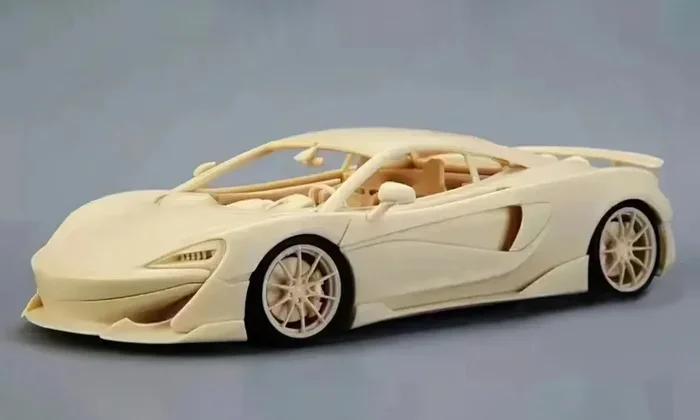
A 3d printed car model is a miniature replica of a real vehicle created using additive manufacturing technology. Instead of building from a kit with pre-cut parts, you print each component layer by layer using a 3d printer. The result is a highly detailed miniature car that you assemble, paint, and display.
The process starts with a digital 3d file, often in STL format. This file tells the printer exactly where to deposit material. The printer builds the object from the bottom up, creating thin layers that stack together to form the final shape. This method allows for incredible precision and complex geometries that traditional manufacturing simply cannot achieve.
Why Are 3d Printed Car Models So Popular?
There are several reasons why automotive model enthusiasts are turning to 3d printing in droves. First, the technology has become much more affordable. You can buy a solid entry-level printer for under 300 dollars. Second, thousands of free and paid 3d print files are available online for nearly every car ever made. Third, 3d printing gives you full control over customization.
You can change colors, add custom decals, modify body kits, or even design your own vehicle from scratch. This level of creative freedom is what draws so many people into the hobby. You are not limited to what a manufacturer offers in a boxed kit.
Types of 3d Printers for Car Models
Not all 3d printers are created equal. Different technologies produce different results, and choosing the right one depends on your goals, budget, and experience level. Let us break down the two main types used for 3d printed car models.
FDM Printers
Fused Deposition Modeling, or FDM, is the most common type of 3d printing. It works by melting a spool of plastic filament and extruding it through a heated nozzle. The nozzle moves across the print bed, depositing material layer by layer.
FDM printers are great for beginners because they are affordable and relatively easy to use. They work well for larger-scale car models, typically 1:24 and up. Common filament types include PLA plastic and ABS filament. PLA is easier to print with and has less warping, making it ideal for your first few projects.
However, FDM printers have limitations. The layer lines can be visible on the finished model, and very fine details like grill patterns or tiny headlights may not come out perfectly crisp. You can reduce this issue by using a higher layer resolution setting, but this increases print time significantly.
Resin Printers
Resin printing uses a vat of liquid photopolymer that hardens when exposed to UV light. These printers, also called stereolithography or SLA printers, produce incredibly smooth surfaces and fine details.
If you want to print a 1:24 scale car model or smaller, a resin printer is the way to go. The level of detail is unmatched. Every vent, every badge, every tiny seam is captured beautifully. Resin models look amazing right off the printer and require less sanding than FDM prints.
The trade-offs are higher costs for materials and more involved post-processing. Resin is also toxic and requires careful handling with gloves and ventilation. But for hobbyists who want museum-quality display models, resin printing is hard to beat.
| Feature | FDM Printer | Resin Printer |
|---|---|---|
| Price Range | 150 – 500 USD | 200 – 800 USD |
| Detail Level | Good for larger scales | Excellent for small scales |
| Print Time | Slower for fine details | Faster for small models |
| Material Cost | Lower per gram | Higher per liter |
| Ease of Use | Beginner-friendly | Requires more care |
| Surface Finish | Visible layer lines | Smooth and detailed |
| Best For | Large-scale models | Small-scale detail work |
Getting Started: What You Need
Before you dive into printing your first 3d printed car model, you need a few essential supplies. You do not need everything at once, but having the right tools from the start makes the process much smoother and more enjoyable.
Essential Equipment
- A 3d printer: Choose FDM for larger models or resin for fine detail. Popular beginner options include the Ender 3 for FDM and the Elegoo Mars for resin.
- Filament or resin: PLA filament is the easiest to start with. For resin, pick a standard grey or white automotive-grade resin.
- A slicer program: Software like Cura or PrusaSlicer converts your 3d file into printer instructions. It is free and beginner-friendly.
- Sandpaper: Get a variety of grits from 220 to 2000. You will use these to smooth out your prints before painting.
- Paint and primer: A good paint primer helps paint adhere to plastic and creates a smooth base coat.
- Fine-tip brushes and airbrush: An airbrush gives the best results for car models, but brushes work fine for beginners too.
- Super glue and tweezers: These help with assembling small printed parts securely.
Finding 3d Print Files
The internet is full of resources for finding 3d print files for car models. Websites like Thingiverse, MyMiniFactory, and Printables offer thousands of free designs. You can search by car make, model, and scale. Some designers also sell high-detail files on platforms like Cults3d and MyMiniFactory for a few dollars.
When choosing a file, pay attention to the polygon count and the level of detail in the description. Higher polygon counts usually mean more intricate models. Read reviews from other users to find files that print well and look great after assembly.
Step-by-Step Guide to Printing a 3d Printed Car Model
Now let us walk through the actual process of creating a 3d printed car model from start to finish. This guide assumes you are using an FDM printer, but the principles apply to resin printing as well.
Step 1: Choose and Prepare Your File
Download your chosen stl file and open it in your slicer software. Adjust the scale to match the desired size of your model. Most car model enthusiasts work in scales like 1:18, 1:24, or 1:43. The larger the scale, the more detail you can capture and the easier it is to print.
Set your layer resolution to 0.1mm or lower for smoother surfaces. For a car model, you want the finest detail possible. Enable support structures for any overhanging parts like the roof, side mirrors, or spoilers. Supports are temporary structures the printer creates to hold up areas that would otherwise sag or fail.
Step 2: Slice and Prepare the Printer
Click the slice button in your software to generate the G-code file. This is the set of instructions your printer will follow. Transfer it to your printer via SD card or USB cable. Make sure your print bed is clean and level. A well-leveled bed is critical for the first layer to adhere properly.
Load your filament and preheat the printer. For PLA, a bed temperature of 60 degrees Celsius and a nozzle temperature of 200 degrees Celsius work well. Let the printer run a test bead to confirm everything is set up correctly before committing to the full print.
Step 3: Print Your Car Model
Start the print and let it run. Depending on the scale and complexity, a 3d printed car model can take anywhere from 8 hours to several days. Larger 1:18 scale models may require multiple days of continuous printing.
Resist the urge to open the printer or disturb the model during printing. Even a small bump can ruin a part that is still being laid down. Use a print bed with a good adhesion surface like a glass plate with glue stick to prevent warping.
Step 4: Remove and Clean the Parts
Once the print is complete, carefully remove it from the bed. Use a spatula or scraper if needed, but be gentle to avoid damaging the model. Clip off any support structures with flush cutters or needle-nose pliers.
Rinse the parts under warm water to remove any loose debris. If you printed with ABS, you can smooth the surface using acetone vapor treatment. For PLA, sanding is your best option. Start with coarse 220-grit sandpaper and work your way up to 1000-grit for a silky-smooth finish.
Step 5: Prime and Paint
Apply a thin coat of paint primer to all parts. This serves two purposes. It helps the paint stick to the plastic, and it reveals any imperfections you missed during sanding. Sand lightly with 1500-grit paper after the primer dries, then apply a second coat.
Once the primer is smooth and dry, you can begin painting. Use acrylic paints for the best results on plastic models. Apply thin, even coats and let each layer dry completely before adding the next. For a realistic finish, consider using a clear coat sealant to protect the paint and add a professional gloss.
Step 6: Assemble and Display
Use super glue to attach the painted parts together. Work slowly and check alignment before the glue sets. Small clamps or rubber bands can hold parts in place while they dry.
Once assembled, find a nice display case or shelf to showcase your 3d printed car model. You can add a custom base, a small plaque with the car name, or even LED lighting to make it truly special.
Tips for Amazing Results
Getting a 3d printed car model that looks professional takes practice and attention to detail. Here are some expert tips that will elevate your builds.
Start with a simple design. Your first few prints should be straightforward models without too many tiny parts. A basic sedan or coupe shape is perfect for learning how your printer behaves and how different settings affect the outcome.
Use a primer filler spray. This is a game-changer for smoothing FDM prints. The filler fills in layer lines and gaps, giving you a surface that looks like it was injection-molded. Many professional model building enthusiasts swear by this technique.
Invest in good paint. Cheap paints can look chalky and uneven. A set of quality acrylic paints from brands like Tamiya or Vallejo makes a noticeable difference in the final appearance of your automotive model.
Add decals and weathering. Once your base paint job is done, add water-slide decals for headlights, taillights, and interior details. For a realistic touch, try light weathering with washes and dry-brushing to simulate dust and wear on the car.
Join online communities. Forums and social media groups dedicated to 3d printed car models are goldmines of advice. You will find printable files, painting tutorials, and friendly feedback from experienced builders who love to share what they know.
Common Mistakes to Avoid
Every beginner makes mistakes, but learning from others can save you hours of frustration. Here are the most common pitfalls when printing 3d printed car models and how to avoid them.
Skipping the sanding step. This is the number one mistake new builders make. Skipping sanding means your layer lines will show through the paint, and the final result will look rough and unfinished. Always sand your parts thoroughly before priming.
Using too much support material. Supports are necessary, but excessive supports create more work during cleanup. Adjust your slicer settings to generate supports only where absolutely needed. Many modern slicers have smart support features that minimize waste.
Rushing the paint job. Thick paint coats drip, dry unevenly, and obscure detail. Thin, even coats applied in multiple passes always produce better results than one heavy coat. Patience here pays off enormously.
Ignoring proper filament storage. PLA and ABS filament absorb moisture from the air over time. Wet filament causes poor print quality, stringing, and bubbling. Store your spools in airtight bags with silica gel packets to keep them dry and printing well.
Not testing at a smaller scale first. Before committing to a large, time-consuming print, do a small test print of a single part. This lets you check the scale, detail level, and print settings without wasting hours or material.
Expert Insights: What the Pros Want You to Know
We reached out to experienced model building enthusiasts and 3d printing hobbyists to gather their best advice for newcomers. Here is what the experts had to say.
Start small and celebrate progress. Your first 3d printed car model will not be perfect, and that is completely okay. Every build teaches you something new. The skills you develop on your first project will make your second one noticeably better.
Invest in a good slicer profile. Many experienced users share their custom slicer settings online for specific printers and filaments. Using a proven profile saves you from weeks of trial and error and gives you excellent results from day one.
Post-processing is where the magic happens. A raw print is just a plastic shape. It is the sanding, priming, painting, and detailing that transforms it into a true display model. Spend at least as much time on post-processing as you do on printing.
Keep a print journal. Write down your settings, filament brand, and results for each build. Over time, you build a personal reference library that helps you troubleshoot problems and replicate successes. It is one of the best habits you can develop as a hobbyist.
Key Takeaways
- 3d printed car models offer unmatched precision: modern printers can capture every curve and detail of real vehicles with stunning accuracy.
- FDM and resin printers serve different needs: FDM is affordable and great for larger models, while resin delivers finer detail for small-scale builds.
- Post-processing makes a huge difference: sanding, priming, and painting transform a rough print into a professional-quality display piece.
- Start simple and scale up: beginners should begin with basic kits before tackling complex, highly detailed builds.
- Quality filament matters: PLA and ABS are the most popular choices, each offering different benefits for car model projects.
- Patience is your best tool: rushing through steps like sanding or painting leads to disappointing results every time.
Frequently Asked Questions
What scale is best for a 3d printed car model?
The best scale depends on your printer size and detail goals. 1:24 is a popular choice for FDM printers because it offers good detail without requiring enormous print beds. 1:18 makes a bigger, more impressive display piece but takes significantly longer to print. For resin printers, 1:43 or even 1:64 can produce stunning results with incredible detail.
Do I need a 3d printer to get started?
Yes, you need access to a 3d printer to create your own models. However, you do not have to own one. Many local maker spaces and libraries offer printer access. You can also order prints from online services if you prefer not to invest in a printer right away.
How long does it take to print a car model?
Print time varies widely based on scale, detail level, and printer speed. A small 1:43 scale model might take 4 to 8 hours. A large 1:18 scale model with fine details can take 3 to 7 days of continuous printing. Plan accordingly and be prepared for longer print times on complex builds.
What is the easiest filament for beginners?
PLA is the easiest filament for beginners. It prints at lower temperatures, has minimal warping, and does not require a heated bed in most cases. It is also biodegradable and has a pleasant smell during printing. ABS is stronger and more heat-resistant but requires more experience and a closed printer enclosure.
Can I customize a 3d printed car model design?
Absolutely. One of the biggest advantages of 3d printing is customization. You can modify existing files to change colors, add custom racing stripes, alter body kits, or even combine parts from different car models. If you are ambitious, you can learn 3d modeling software and design your own vehicles from scratch.
How do I make my printed car model look realistic?
Realism comes from careful post-processing. Sand thoroughly, apply a quality primer, and paint in thin, even layers. Add decals for windows and trim. Use washes to create shadows in panel lines. Apply a clear coat for a realistic glossy or matte finish. Small details like adding a steering wheel inside the cabin or interior stitching make a big difference.
Conclusion
3d printed car models represent one of the most rewarding hobbies available to creative people today. The combination of digital design and physical craftsmanship creates something truly special. Whether you are printing your first simple sedan or your tenth detailed supercar, each build teaches you something new and pushes your skills further.
The beauty of this hobby is that it is accessible to everyone. You do not need expensive equipment or years of experience to create something beautiful. A basic printer, some affordable filament, and a willingness to learn are all you need to get started. The 3d printing community is welcoming and full of resources to help you along the way.
So pick a car you love, find a great stl file, and start printing. Your dream scale model car is just a few layers of plastic away. The journey from digital file to finished display model is one of the most satisfying creative experiences you can have. Happy printing, and enjoy the ride!